Parse PDFs. Power LLMs.
Your Model is Only As Smart As What You Feed It. Most PDF parsers were built before LLMs existed. They drop tables, scramble reading order, flatten structure into noise. PDF4LLM fixes that.


The Gap in Every RAG Pipeline
A PDF isn't a Document.
It's a Rendering Instruction.
There's no concept of “heading”, “table”, or “reading order” inside a PDF file, only coordinates, fonts, and draw commands. Every parser has to reconstruct meaning from that. Most get it wrong. PDF4LLM resolves structure, reading sequence, table layout, and document hierarchy before a single token reaches your model.

Why You Need a Parser
There's a Hidden Cost to
Skipping the Parser
Skip the parser and your AI model rasterizes every page into images first, then bills you at vision token rates for content that was machine-readable text all along. Vision tokens can cost 10–20× more than text tokens. Feed enough documents and you're paying a premium for a problem that didn't need to exist.
Vision Language Model
Great for scans
Necessary for handwritten or scanned docs
Overkill for digital PDFs
Heavy GPU inference on simple text layers
Slow & Expensive
Reconstructs text visually instead of reading it
Cost at Scale
Vision token rates on machine-readable text
PDF4LLM
Perfect for born-digital PDFs
Extracts text directly from the source layer
Instant & precise
No rasterization, no vision overhead
Structured topology
Reconstructs reading order mathematically
Cost at Scale
Text token rates. Calculated on Google Cloud Compute.

From Raw PDF to Structured Intelligence
PDF4LLM breaks a document into its components, identifies each one, and delivers structured data directly to your LLM. PDF4LLM does this by training Graph Neural Networks on PDF internals rather than rendered images. Giving you greater accuracy, CPU-only, at 10× the speed.
Supported Inputs
Supports a wide range of input formats PDF, XPS, EPUB, CBZ, MOBI, FB2, SVG, TXT, images, and more. Office formats (DOCX, XLSX, PPTX) are available with a commercial license.
The Part Other Parsers Skip.
The Part That Actually Matters.
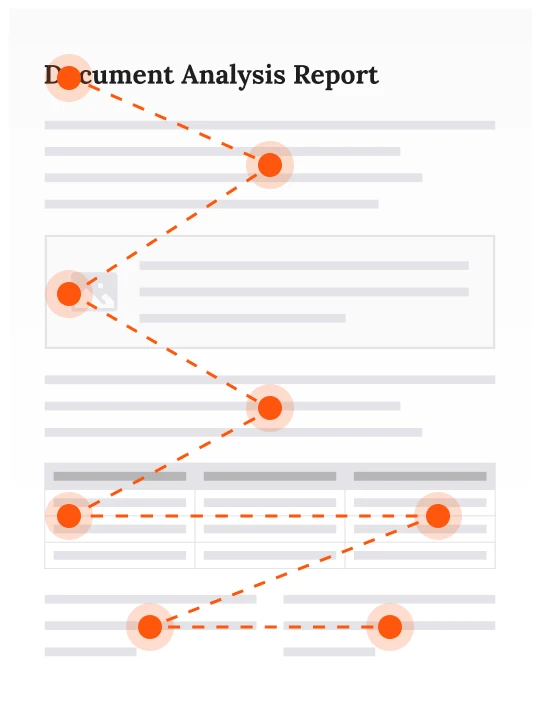
Multi-column layouts, sidebars, footnotes — in the right order.
Get the sequence wrong and your model reasons over noise, not content. PDF4LLM reconstructs the order a human would read, not the order the renderer drew it.

No GPU. No cloud dependency.
No tradeoff.
Every other parser that reaches this level of extraction accuracy requires a GPU and still takes seconds per page. PDF4LLM runs CPU-only. Same output quality. No infrastructure tax.
- 0M+
- Monthly PyPI downloads
- 0.0K
- GitHub stars
- 0+ yrs
- MuPDF engine heritage
- 0
- GPUs required
The same baseline extraction quality. Whatever runtime you're already in.
Don't change parsers because you changed languages. One extraction quality. One commercial relationship.



PyMuPDF4LLM
The original. Built for Python's AI/ML ecosystem. Perfect for data scientists and LLM developers who want the best PDF extraction quality for RAG, fine-tuning, and everything in between.
- PDFMarkdown with layout
- Page chunking for RAG
- Table extraction
- Image extraction per page


PDF4LLM (.NET)
Enterprise-grade PDF intelligence for .NET 8+. Built on the same MuPDF engine as PyMuPDF4LLM, but architected for C# and .NET developers. Get the same extraction quality without switching languages or parsers.
- PDFMarkdown with layout
- Page chunking for RAG
- Table extraction
- Image extraction per page


PDF4LLM (JS)
SOONWASM-powered PDF-to-Markdown for Node.js. Perfect for client-side applications, serverless functions, and anyone in the JavaScript ecosystem who wants to integrate PDF4LLM's extraction quality without leaving JS.
- PDFMarkdown (WASM)
- RAG-ready chunking with overlap
- Serverless-first architecture

Show and understand documents with one engine, powered by AI citation.
MuPDF WebViewer renders PDFs for your users. PDF4LLM extracts the same content for your AI pipeline. Because both run on the same MuPDF C core, the extraction preserves the exact coordinates of every block of text, so when your LLM returns an answer, you can locate the source passage directly in the viewer.
Learn MoreStart with clean documents.
Everything else gets easier.
One install. Your pipeline stays the same. Your model finally gets the input it deserves.
# pip install pymupdf4llm

import pymupdf4llm
md = pymupdf4llm.to_markdown("document.pdf")
# -> Clean markdown, tables intact, images extracted, ready for embedding